
Advanced Parameter Transcription
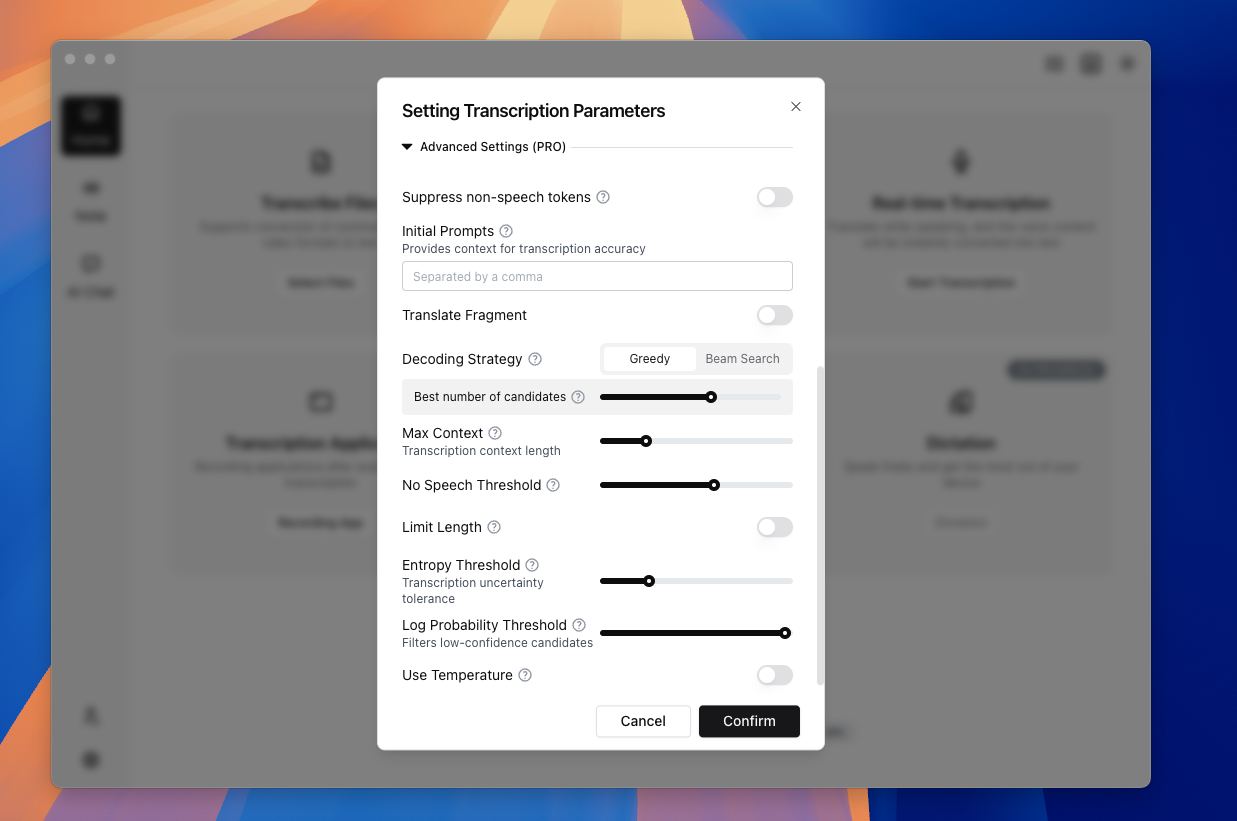
TODO (Screenshot Replacement): Advanced parameter panel (App 2.0) Include: Prompt, Beam Search, no-speech threshold, temperature, max context, and reset/apply controls. Suggested filename:
advanced-params-v2-en.png
Scope
Advanced parameters tune decoding and segmentation behavior. They do not change business workflows such as link downloading or watch scheduling.
Key controls include:
- Scene presets (Whisper / Sherpa)
- Suppress non-speech tokens
- Prompt
- Decoding strategy (Greedy / Beam Search)
- Maximum context
- No-speech threshold
- Segment transcription and offset range
- Length limit
- Entropy threshold
- Log probability threshold
- Temperature
- Sherpa VAD advanced controls (min speech/silence, padding, segment duration)
Use Cases
- Hallucination or repetitive output in noisy audio
- Domain-heavy vocabulary with unstable recognition
- Long-form audio with coherence issues
- High-accuracy review pipelines
Steps
- Open advanced parameters in transcription settings or task dialog.
- Run a baseline with defaults.
- Change only 1–2 parameters per test iteration.
- Track parameter/result pairs for reusable team presets.
- For realtime tasks, start with realtime presets before copying offline values.
Quick tuning tips
- Hallucination: increase no-speech threshold, lower temperature, reduce max context
- Terminology misses: add prompt terms and test Beam Search
- Incomplete output: carefully lower log probability threshold
- Over-fragmented segments (Sherpa): increase min speech duration and min segment duration
- Segments too long (Sherpa): decrease max segment duration and merge gap
Whisper parameter map (File Transcription)
| Group | Core controls | Impact |
|---|---|---|
| Scene presets | general / dialogue / speech / meeting / course / noisy / custom | Quickly applies a parameter bundle for content type |
| Segmentation scope | Segment transcription, offset range, length limit | Controls what part gets transcribed and segment granularity |
| Stability controls | no-speech threshold, suppress non-speech, max context | Controls hallucination, repetition, and coherence |
| Decoding strategy | Greedy / Beam Search, best-of, beam-size | Trades speed against stability |
| Fallback policy | entropy threshold, log probability threshold, temperature | Handles low-confidence regions |
Sherpa parameter map (File Transcription)
| Group | Core controls | Impact |
|---|---|---|
| VAD scene presets | general / dialogue / speech / meeting / course / noisy / custom | Sets default segmentation style and sensitivity |
| Detection step | VAD frame duration (vadFrameMs) | Smaller step detects faster changes but costs more resources |
| Trigger thresholds | min speech duration, min silence duration | Controls when a segment starts/ends |
| Boundary correction | pre-pad, post-pad, merge gap | Reduces clipped words and over-fragmentation |
| Segment bounds | min/max segment duration, split search window | Prevents extremely short/long segments |
| Throughput | threads | Balances speed vs CPU usage |
Recommended tuning order
- Pick a scene preset first (Whisper or Sherpa).
- Change only 1–2 core controls in each round.
- Compare with the same sample set and log parameter-result pairs.
- Promote only proven settings to team presets.
Term Explanations
- Prompt: vocabulary/context hint for recognition, not a generic LLM command.
- No-speech threshold: controls how aggressively silence/background is filtered.
- Log probability threshold: confidence cutoff that affects truncation vs noise tolerance.
Real Scenario: Terminology-heavy Technical Recording
- Run a default baseline and mark high-error segments.
- Add domain terms into Prompt, then tune Beam Search only.
- If hallucination persists, adjust no-speech threshold and temperature.
- Change only 1–2 parameters per round and log outcomes for rollback.
This controlled iteration model is usually more reliable than bulk-changing all knobs at once.
Common Mistakes
- Mistake 1: Expecting advanced params to replace model selection.
Fix: choose the right model tier first, then tune decoding behavior. - Mistake 2: Editing too many parameters in one pass.
Fix: isolate variables to understand real impact. - Mistake 3: Copying offline presets directly to realtime workloads.
Fix: start with realtime-safe presets and tune for latency constraints.
FAQ
Q: Is Beam Search always better than Greedy?
A: Not always. Beam Search often improves stability but usually costs more latency.
Q: Can Prompt enforce output format like an LLM instruction?
A: No. Whisper prompts are contextual hints, not general instruction control.
Q: Are Sherpa scene presets the same as Whisper scene presets?
A: No. Both are called “scene presets,” but they tune different internals: Whisper focuses on decoding behavior, Sherpa focuses on VAD segmentation behavior.
Q: Why do results differ across machines with same settings?
A: Hardware, drivers, runtime backends, and resource pressure all influence outcomes.
Limitations
- Parameter behavior is language- and noise-dependent.
- Some advanced controls may be restricted by entitlement/version.
- Extreme values can cause empty output, instability, or severe latency.
- Platform: Advanced params are available on both Windows/macOS, but backend differences can change same-setting outcomes.
Contact us